Home security cameras 2026: a 128GB card holds three days, and the PDPA rules

Home security cameras have become cheap enough to buy on impulse, but the real cost and the real constraints are not in the camera's price.
This article covers two things ordinary reviews do not: the storage you actually need, in numbers, which is the true cost of the system, and what Thailand's PDPA says your camera may film — which is what starts real arguments with neighbours.
The real cost is storage, not the camera
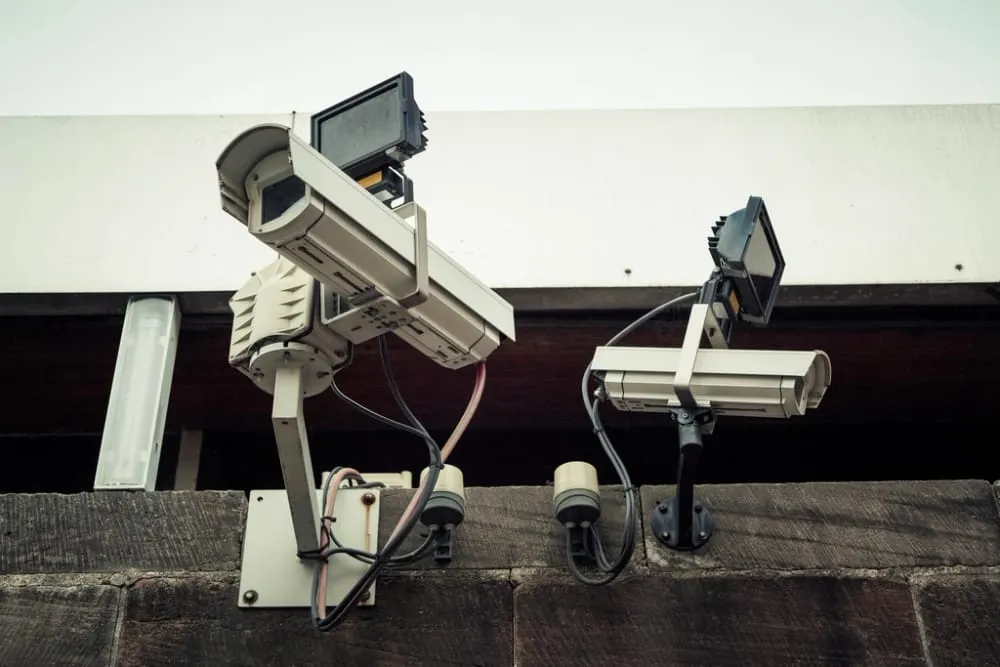 Photo: Markus Spiske — CC0 (rawpixel)
These are the figures to see before choosing a resolution.
Continuous 24-hour recording, per camera:
| Resolution / codec | Per day | 128GB card | 256GB card | 2TB hard drive |
|---|---|---|---|---|
| 1080p H.264 | ~42 GB | 3 days | 6 days | 49 days |
| 1080p H.265 | ~21 GB | 6 days | 12 days | 97 days |
| 2K (1440p) H.265 | ~42 GB | 3 days | 6 days | 49 days |
| 4K H.265 | ~84 GB | 1.5 days | 3 days | 24 days |
⚠️ The 128GB card bundled with a camera holds three days of continuous recording, after which it overwrites — so if you go away for a week and come home to a break-in, the footage from the day it happened may already be gone.
Recording only on motion changes everything (assuming two hours of events a day):
| Resolution | Per day | 128GB card lasts |
|---|---|---|
| 1080p H.264 | ~3.5 GB | ~36 days |
| 1080p H.265 | ~1.8 GB | ~73 days |
| 2K H.265 | ~3.5 GB | ~36 days |
| 4K H.265 | ~7 GB | ~18 days |
⚠️ Two conclusions follow:
- Turn on H.265 if the camera supports it — double the retention with no noticeable quality loss. The caveat is that some older cameras and browsers cannot play H.265 files.
- Higher resolution halves your retention — 4K holding three days is less useful than 1080p holding twelve, for the case where you are away from home.
Card, NVR or cloud
 Photo: Acabashi — CC BY-SA 4.0 (Wikimedia Commons)
| Storage | Cost | Advantages | Drawbacks |
|---|---|---|---|
| microSD in the camera | One-off | No monthly fee, works when the internet is down | Disappears with the camera if stolen · cards wear out from constant writing |
| NVR + hard drive | Higher one-off | Months of retention, several cameras in one place | Needs space and cabling · also stealable |
| Cloud | Monthly, forever | Survives camera theft, viewable anywhere | Never-ending cost · depends on the internet · your footage sits with a provider |
⚠️ The biggest weakness of card storage is exactly the scenario the camera exists for — a thief who knows what they are doing takes the camera, and the evidence with it. The cheapest fix is to mount cameras out of reach and have at least one backing up event clips to the cloud, which uses far less quota than uploading all day.
⚠️ Ordinary microSD cards are not designed for continuous 24-hour writing. Use a high-endurance card rated for surveillance and treat it as a consumable to replace every year or two. Check monthly that the camera is still actually recording, because card failure rarely announces itself and most people discover it at the moment they need the footage.
 Photo: Afrank99 — CC BY-SA 3.0 (Wikimedia Commons)
⚠️ Count cloud costs over the life of the system, not per month. A 150-baht monthly subscription per camera, for three cameras over three years, is 16,200 baht — several times the cost of the cameras. Compare that against a one-off NVR and hard drive before deciding.
PDPA: what your camera may film
This is the part spec reviews never cover, and the part that causes real disputes.
A camera on your own property protecting your life and property is fine, because PDPA section 4(1) exempts collection of personal data "for personal benefit or for that person's household activities".
But the exemption has limits:
- ⚠️ The moment the camera looks beyond your property — onto a public road, for instance — the PDPA becomes relevant, because you are recording people with no connection to your household.
- ⚠️ Pointing directly at a neighbour's bedroom, windows, laundry area or back yard breaches both the PDPA and Criminal Code section 397, which covers harassment and causing distress to others.
What to do in practice:
- Aim cameras to cover only your own area — the door, the fence, the entrance, not the whole lane.
- Use the privacy mask feature most cameras have, to permanently black out neighbouring property in the recorded file.
- Post a notice that CCTV is in use if the camera covers an area others pass through.
- Do not publish footage showing other people's faces on social media, even when you believe someone did something wrong — naming and shaming can become your own offence. Give it to the police instead.
- Change the camera's password immediately after installation and update the firmware — a camera on factory credentials is a camera other people can watch.
⚠️ Point 5 is a bigger risk than people think. Cheap, unpatched cameras still on factory passwords are found and indexed in large numbers on the internet — a camera installed for security becomes a window for strangers to look into your home.
The specs that actually matter, in order
- Storage options — how large a card it takes, whether it connects to an NVR, and whether the cloud is compulsory. This decides your entire long-term cost.
- Night vision — most incidents happen in the dark. A camera that produces colour at night (needing a light or a sensitive sensor) lets you recognise clothing and car colour; monochrome infrared gives you a shape.
- Field of view — wider sees more area with less detail per area. For a front door, a narrower and sharper view is usually more useful.
- Alerts that distinguish people from everything else — a camera that alerts every time a leaf moves or a cat walks past gets its notifications switched off within a week, which is the same as having none.
- Weather rating (IP65 or better) for outdoor cameras in Thailand, facing driving rain and high humidity.
- PoE or wireless — PoE is far more stable and carries power and data in one cable; wireless installs easily but still needs power and depends on Wi-Fi reaching the front gate.
- Two-way audio — genuinely useful for talking to a delivery driver, not just a gimmick.
Common mistakes
Buying 4K and recording 24/7 to a 128GB card — one and a half days of retention, which is barely useful.
Leaving the factory password — turning a security camera into a security hole.
Mounting within reach — a thief takes the evidence with the camera.
Aiming down the whole lane "to see more" — bringing the PDPA into play and starting an avoidable dispute.
Relying on alerts without ever checking that recording still works — silent card failure is common.
Forgetting the lifetime cloud cost — three cameras for three years at 150 baht each per month is 16,200 baht.
Posting footage online to shame someone — it can become your own offence. Give it to the police.
Using Wi-Fi alone for a camera at the front gate — the signal often does not reach, and the video stutters or drops exactly when it matters.
Summary
- Continuous 1080p H.264 = ~42 GB/day — a 128GB card fills in three days.
- Motion-only recording stretches that to ~36 days on the same card.
- Turn on H.265 if supported — double the retention.
- Storage is the real cost of the system — count cloud over its lifetime, not per month.
- PDPA section 4(1) exempts household use, but a camera seeing the public road brings the PDPA in.
- Filming into a neighbour's home breaches the PDPA and Criminal Code section 397 — use a privacy mask.
- Change the password and update firmware immediately — a factory-password camera is a public camera.
Sources
- PDPA.pro — CCTV use and PDPA compliance
- AppDisqus — Thailand's PDPC clarifies that home CCTV is not automatically a PDPA breach
- T-REG — does installing CCTV breach PDPA privacy rights?
- Okami — Thai CCTV law 2025–2026: installing without breaching PDPA
Storage figures are calculated from approximate bitrates (1080p H.264 at 4 Mbps, H.265 at 2 Mbps, 4K H.265 at 8 Mbps), which are typical for home cameras but vary with model, frame rate and scene complexity — a camera watching a busy scene uses a higher bitrate. The legal information is general guidance for decision-making, not a legal opinion on any specific case.
Frequently asked questions
- What card capacity is enough?
- It depends on whether you record continuously or only on motion. Continuous 1080p H.264 uses about 42 GB a day, so a 128GB card fills in three days. Recording only on motion, perhaps two hours a day, the same card lasts about 36 days.
- Is a camera at my front gate a PDPA problem?
- Not if it is there to protect your own life and property, because PDPA section 4(1) exempts collection for purely personal or household purposes. But once the camera looks out onto a public road or someone else's land, the PDPA becomes relevant.
- Can it film my neighbour's house?
- No. Pointing directly at a neighbour's bedroom, windows, laundry area or back yard breaches both the PDPA and Criminal Code section 397. Where the angle is unavoidable, use the privacy mask feature most cameras provide.
- What resolution should I choose?
- 1080p is enough to see what happened at close range, but reading a number plate or recognising a face at distance needs 2K or more — at the cost of doubling your storage requirement.
- Card or cloud?
- A card has no monthly fee but disappears with the camera if it is stolen; cloud is safe from theft but costs continuously and depends on your internet. The best arrangement is both — the card as primary, with the cloud holding only event clips.
- Wireless or wired?
- Wireless is easy to install but still needs power (unless battery-powered) and depends on Wi-Fi reaching the spot. Wired PoE is far more reliable and carries power and data in one cable, which suits any house you can run cable in.
Related articles

AIS vs True vs NT 2026: Which Thai Mobile Network Should You Pick?
Compare AIS, True (merged with dtac) and NT in 2026 — postpaid prices, prepaid/annual SIMs, 5G speed, coverage, plus how to switch networks and keep your number.

iPhone 18 Series 2026: Price, Specs Before Sept 9 Launch
Every leak on the iPhone 18 Pro, Pro Max, and iPhone Fold before Apple's Sept 9 event: predicted Thailand pricing, the A20 chip, and buy-now-or-wait advice
iPhone 17 vs Samsung Galaxy S26 2026: Which Flagship Is Worth It
Full comparison of the iPhone 17 lineup vs Samsung Galaxy S26 series: Thailand pricing, display, chip, camera, battery, AI, and which resells for more.