SSD vs HDD 2026: Gen5 doubles the number on the box and saves 27 minutes over three years

"SSD or HDD?" has been easy to answer for years — SSD for the system and programs, HDD for bulk storage.
The harder and more important question in 2026 is which SSD, because shops will push you towards Gen5 with a number on the box that is nearly twice as large. This article works out what that number actually buys you in time.
How SSDs and hard drives differ, and by how much
An HDD stores data on spinning magnetic platters, with a head that must physically travel to the data — a genuine machine. An SSD stores it on flash memory chips with nothing moving at all.
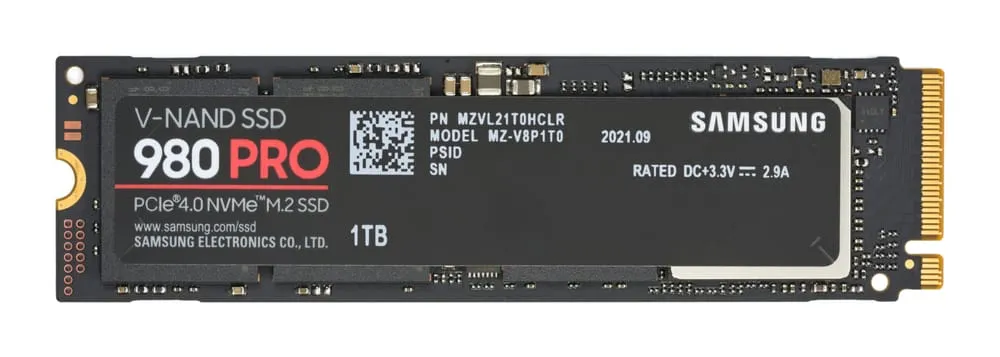 Photo: D-Kuru — CC BY-SA (Wikimedia Commons)
| SSD (NVMe) | HDD | |
|---|---|---|
| Sequential read | up to about 14,500 MB/s | about 285 MB/s |
| Access time | microseconds | milliseconds (about 1,000× slower) |
| Moving parts | none | platters and a head |
| Noise | silent | audible head movement |
| Shock resistance | excellent | vulnerable if dropped while running |
| Power draw | lower | higher |
| Cost per capacity | about 3× dearer | cheapest available |
| Maximum per drive | typically 4–8TB | up to 22TB and beyond |
⚠️ The most important figure in that table is not "14,500 vs 285" but access time. What makes a computer feel slow is not copying large files, it is the system reading thousands of small scattered files — when booting, opening a program, switching windows. A hard drive must move its head to each one; an SSD reads every location equally fast.
That is why moving from a hard drive to an SSD delivers more perceived speed per baht than any other upgrade — more than memory, more than a CPU. If your machine still boots from a hard disk, that is the only thing to change.
NVMe vs SATA, and Gen4 vs Gen5 — what the shop will sell you
SATA vs NVMe is about the connection: a SATA SSD is limited to about 550 MB/s by the cable, while NVMe plugs straight into PCIe lanes and is far faster. If the motherboard has an M.2 slot, use NVMe.
Gen4 vs Gen5 is the question most often answered wrongly in 2026.
| Gen4 (e.g. Samsung 990 PRO) | Gen5 (e.g. Samsung 9100 PRO) | |
|---|---|---|
| Sequential read (on the box) | ~7,450 MB/s | ~14,000 MB/s |
| Random 4K at QD1 | — | virtually identical |
| Game load times | — | under half a second apart |
| Heat | manageable | much hotter, needs a heatsink |
| Price | cheaper | dearer |
⚠️ Why nearly double the bandwidth changes nothing you can feel — loading a game is not one large file copy. It is thousands of small random reads, plus decompression work handled by the CPU (or increasingly the GPU via DirectStorage), plus waiting on the rest of the pipeline. The figure that correlates with load times is random 4K at QD1, and it has barely moved between Gen4 and Gen5.
In actual time saved — assume Gen5 is half a second faster per load (the best case in testing) and you load a game three times a day, every day, for three years:
0.5 seconds × 3 loads × 365 days × 3 years = 1,642 seconds ≈ 27 minutes
⚠️ 27 minutes across three years is what the Gen5 premium buys. Spend that premium on capacity instead and it benefits you every day rather than by half a second.
Who Gen5 is worth it for: anyone routinely moving enormous files — 8K video editing, working with datasets of hundreds of gigabytes, frequent copies between two NVMe drives. That is work where sequential bandwidth genuinely matters. For everyone else, a quality Gen4 drive at a lower price is the smarter buy in 2026.
Hard drives still have a place, and it is a clear one
 Photo: epSos.de — CC BY (Wikimedia Commons)
Hard drives are not dying, they have moved to the job they win outright: capacity per baht.
- Cost per TB: HDDs run about $25–31 per TB against roughly $75–100 per TB for SATA SSDs.
- The clearest example: a 22TB NAS-class hard drive at about $549 costs less than a premium NVMe of only 4TB.
Jobs that should use a hard drive:
- NAS and home servers — you are paying for capacity, not speed.
- Backups — written once and kept; speed is irrelevant.
- Video and photo archives — large files read sequentially, which hard drives handle acceptably.
- Security cameras — continuous writing, needing maximum capacity per baht (see home security cameras).
The arrangement that suits most people: a 1–2TB NVMe SSD for Windows, programs and the games you are currently playing, plus a large hard drive for everything else.
⚠️ SSD prices spiked in 2026 — what to know before buying
This changes the advice from previous years.
Memory prices rose sharply in 2026 for two reasons at once: AI server demand for memory, which absorbed enormous manufacturing capacity, and temporary fab shutdowns earlier in the year following typhoon disruption.
The measured effect: the Samsung 990 Pro 2TB went from about $189 to over $400 in April 2026 — more than double.
⚠️ What to do in a market like this:
- Do not buy capacity for the future while prices are abnormally high. Buy what you need this year and add later — a second M.2 drive is easy if the board has a free slot.
- Cost per TB now moves faster than before, so compare on the day you buy rather than trusting figures in an older review.
- The Gen4-to-Gen5 premium is even worse value in an expensive market, because that money now buys more capacity than it used to.
Endurance, and what people get wrong
SSDs do not fail more easily than hard drives. That belief comes from the earliest SSDs and has been obsolete for years.
- TBW (terabytes written) is the volume manufacturers warrant over the drive's life, usually several times what a normal user will write in the machine's lifetime.
- SSDs handle shock far better, with no head to strike a platter — important in a laptop.
- Hard drives sometimes warn before failing (unusual noises, SMART attributes), while SSDs tend to fail more quietly.
⚠️ But the real conclusion is that both types fail, and what protects your data is backups, not drive type. The 3-2-1 rule still applies — three copies, on two kinds of media, with one off-site. See our cloud storage comparison for the off-site copy.
Common mistakes
Paying extra for Gen5 expecting a faster computer — see the 27-minute calculation again.
Judging by the sequential read number on the box — the figure least related to actual use.
Buying an SSD too small because prices are high — an SSD past about 90% full slows noticeably, with fewer free blocks to manage. Leave 15–20% free.
Using an SSD as your only backup — whatever the drive type, data with one copy is not backed up.
Installing an NVMe in an M.2 slot that shares PCIe lanes without reading the motherboard manual — some boards disable SATA ports when M.2 is populated, and a connected hard drive simply disappears.
Not fitting a heatsink to a fast NVMe — when it overheats the drive throttles to protect itself, making an expensive drive slower than a cheap one.
Summary
- SSD for system and programs, HDD for capacity — that answer has not changed.
- Access time, not bandwidth, is what makes a machine feel fast — which is why HDD-to-SSD beats every other upgrade.
- Gen5 is not worth it for most people — nearly double the bandwidth for about 27 minutes saved over three years.
- A quality Gen4 drive at a lower price is smarter, unless you routinely move enormous files.
- HDDs still win outright on capacity per baht — about 3× cheaper, and one 22TB drive beats a 4TB NVMe on price.
- 2026 prices are volatile — compare cost per TB on the day, and do not stock up while prices are high.
- Backups matter more than drive type — both kinds fail.
Sources
- FinalBoss — PC gaming SSD buying guide 2026: PCIe Gen4 vs Gen5
- RankedSSD — PCIe 4 vs PCIe 5 SSD: speed, heat and which to buy
- Tech Insider — SSD vs HDD 2026: 14,500 MB/s vs 285 MB/s tested
- Diskopedia — SSD vs HDD price per TB: a 2026 cost analysis
- TerabytePrices — SSD vs HDD: which should you buy in 2026
Speed figures are manufacturer ratings and measurements from review sites, and vary with test system, cooling and drive state. Prices are in US dollars from the sources cited and moved very fast during 2026 — always check the local cost per TB on the day you buy.
Frequently asked questions
- What is the difference between an SSD and an HDD?
- A hard drive uses spinning magnetic platters and a head that must physically move to the data, while an SSD uses flash memory chips with no moving parts at all. SSDs are therefore tens of times faster, silent, more power-efficient and far more shock-resistant.
- Is NVMe Gen5 worth it over Gen4?
- For most people and for gamers, no. Gen5 nearly doubles sequential bandwidth, but what makes a computer feel fast is small random reads (random 4K QD1), which has barely improved between the generations. Game load times differ by under half a second.
- Should I still buy a hard drive?
- Yes, when what you need is capacity per baht — video files, backups, or a NAS. HDDs cost roughly three times less per terabyte, and a single 22TB drive still costs less than a premium 4TB NVMe.
- Do SSDs fail more easily than hard drives?
- No. With no moving parts they are far more shock-resistant, and the TBW endurance manufacturers warrant is usually several times what a normal user will ever write. But both types fail — what protects your data is backups, not the drive type.
- What should I upgrade first on a slow computer?
- If the system drive is still a hard disk, replacing it with an SSD is by far the largest perceived speed gain per baht — more than adding memory or changing the CPU.
- Why are SSD prices high in 2026?
- Memory demand from AI servers combined with temporary fab shutdowns earlier in the year pushed prices up sharply — the Samsung 990 Pro 2TB rose from about $189 to over $400 in April 2026.
Related articles

Buying a monitor 2026: learn the PPI sum and size versus resolution answers itself
How to match screen size to resolution with the actual PPI arithmetic, which refresh rates are worth paying for, panel types, and the mistakes that lead to the wrong monitor.

AMD vs Intel 2026: which CPU is better value, with real electricity and motherboard costs
AMD Ryzen X3D against Intel Core Ultra in 2026 — gaming, production work, the electricity difference in actual baht, and the socket lifespan that decides your next upgrade.

Buying a laptop 2026: soldered RAM is a permanent spec, and it changes your cost per year
The laptop specs that actually matter in 2026 — upgradeable versus soldered memory, the new LPCAMM2 standard, cost per usable year, and what Thai buyers overlook.