Mechanical Keyboards for Beginners 2026: How to Choose Wisely

Been wanting to try a mechanical keyboard for ages, but every page is full of jargon — Linear, Tactile, Gasket, Hot-swap, PBT, 75%... and you don't know where to start? This guide explains everything in plain language; you don't have to be a gamer or a tech nerd to follow it. The goal: help you pick the right first keyboard the first time, without wasting money buying twice — complete with recommended models and Thai prices for 2026.
Prices in this article are current as of June 2026. Keyboard prices and available models change with promotions, so check the real price on the day you buy.
Why a mechanical keyboard?
The generic keyboard that comes with your PC (a "membrane" keyboard) uses a single rubber sheet under all the keys. It feels soft and mushy, and as the rubber tires over time, typos creep in.
A mechanical keyboard uses an independent switch under each key. The real, tangible benefits:
- Far more durable — quality switches are rated for 50–100 million presses, versus around 5–10 million for membrane. That's years of use with no dead keys.
- More accurate, faster typing — each key gives clear feedback, so you know it registered without bottoming out every time.
- Customizable — swap switches, swap keycaps, tune the sound and feel to your taste.
- A satisfying sound and feel — many people get hooked on the typing rhythm and never go back.
The trade-offs to accept: a higher price, and some boards are loud (depends on the switch). But in 2026 prices have dropped a lot — usable entry-level boards now start at just a few hundred baht.
The most important thing: pick the right "switch"
The switch determines how a keyboard "feels to type on" and how it "sounds" — so choose it first. There are three main families, usually named by color:
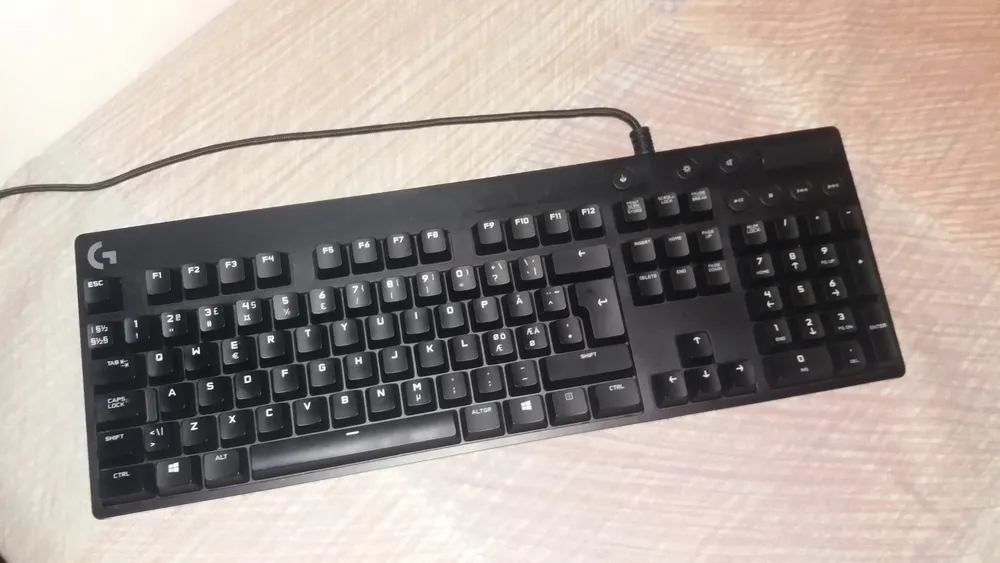 Photo: Unknown — CC CC0 (Openverse)
1. Linear (Red) — smooth, slick, quiet
Presses straight down with no bump and no click — the feel is the same from top to bottom, the smoothest and quietest of the three.
- Best for: gaming (smooth rapid presses), people who like a clean feel, and anyone who needs a degree of quiet.
- Worth knowing: because there's no signal, some people feel they "mis-press" while typing at first — it takes a little adjustment.
2. Tactile (Brown) — a light bump
As you press, you feel a light bump at the point where the key registers — like a signal that says "it's pressed" — but without a loud click.
- Best for: beginners who can't decide, because it's the best middle ground — you get typing feedback without enduring a loud noise, and it suits both typing and gaming.
- Worth knowing: if you don't know which switch to start with, start with Brown — it's the safest bet.
3. Clicky (Blue) — both a bump and a click
On top of the bump, there's a clear "click" sound every press, giving the most satisfying typing feel.
- Best for: people who love a clacky sound and sit alone, disturbing no one.
- Worth knowing: it's very loud — not for shared offices, online classes, or meetings with your mic on; everyone around you will hear it.
| Switch | Feel | Sound | Best for |
|---|---|---|---|
| Linear (Red) | Smooth, no bump | Quiet | Gamers, smooth-feel fans, quiet rooms |
| Tactile (Brown) | Light bump | Medium | Beginners, typing + gaming |
| Clicky (Blue) | Strong bump | Very loud | Click-sound lovers, sitting alone |
| Silent (extra-quiet) | Varies by model | Quietest | Offices, bedrooms, late-night use |
Tip: if you can, try real switches at a store, or buy a "switch tester" for a few hundred baht to compare sound and feel before deciding — cheaper than buying a whole keyboard you end up disliking.
The rising switch of 2026: Magnetic / Hall Effect
In 2025–2026, magnetic switches (Magnetic Switch / Hall Effect) swept into the market fast. Instead of traditional electrical contacts, these switches use a magnetic field to read how far the key is pressed, which means:
- Adjustable actuation — set it to trigger at just 0.1 mm of travel, or deeper, all via software.
- Rapid Trigger — the key resets the instant you lift your finger, making rapid repeated presses very fast — exactly what FPS gamers want.
The headline is that prices have dropped sharply — boards like the Ajazz AK820 Max HE are available for under 2,000 THB in 2026, putting them within reach of everyone.
But do beginners need it? If you play competitive games seriously (Valorant, CS), it's well worth it. But if you mostly type, a regular mechanical switch is plenty and gives a better typing feel for the same money — no need to rush to pay extra for a feature you may not use.
Choosing the right "size" for your use
The layout affects both desk space and convenience. Many beginners accidentally buy one too small to use comfortably, or so big it eats the desk. Check this table first:
| Size | Keys (approx.) | Numpad | Arrow keys | Best for |
|---|---|---|---|---|
| Full-size (100%) | 104 | ✅ | ✅ | Number entry, accounting, Excel, office work |
| 96% / 1800 | 100 | ✅ (tight) | ✅ | Want a numpad but save space |
| TKL (80%) | 87 | ❌ | ✅ | Gaming + general work, lots of mouse room |
| 75% | 84 | ❌ | ✅ | Most popular in 2026 — compact but complete |
| 65% | 68 | ❌ | ✅ (tight) | Portability, small desks |
| 60% | 61 | ❌ | ❌ (uses Fn) | Minimalists, very little space |
The simple takeaway for beginners:
- Document work, frequent number entry → Full-size or 96%
- General use + some gaming → TKL (80%) or 75% (most recommended — compact, keeps arrow keys and F1–F12)
- Very small desk, aesthetics-focused → 65% (60% only suits people already used to the Fn layer, since it has no dedicated arrow keys)
If you're setting up a whole new computer desk, you might want to read our 2026 monitor buying guide alongside this — the keyboard, monitor and mouse are the three things that affect hand comfort and eye strain the most.
Features worth knowing before you buy (explained without the jargon)
 Photo: Unknown — CC CC0 (Openverse)
Hot-swap — change switches yourself, no soldering
A hot-swap keyboard lets you pull a switch out and plug a new one in like Lego, with no soldering iron. The benefit: if you buy it and dislike the switch, you can change it without tossing the whole board. We recommend beginners choose a hot-swap model because it cuts the risk of "bought it, hated it."
Gasket mount — softer typing, better sound
This assembly method adds a "shock-absorbing gasket" between the circuit board and the case, making typing feel softer and more flexible with a deeper, nicer sound. In 2026 many boards from around 1,500 THB up are gasket-mounted — a feature that clearly upgrades the typing feel on a modest budget.
Keycaps: PBT vs ABS — choose PBT if you can
Keycaps come in two main materials:
- PBT — durable, matte, doesn't go shiny over time, legends don't wear off easily, deeper sound → recommended
- ABS — brighter colors, lighter, but the surface goes glossy and legends may fade with long use
If your budget allows a choice, look for a model that ships with PBT keycaps from the start — better value in the long run.
Connectivity: wired vs wireless
- Wired (USB-C): lowest latency, no battery to worry about — best for serious gaming.
- Wireless (2.4GHz / Bluetooth): clean desk, easy to carry, switch between multiple devices; good models have low enough latency for general gaming, but need charging.
For a beginner who uses a PC plus a laptop/tablet, having wireless + Bluetooth to switch devices is very convenient.
Budget: how much is worth spending (Thai prices, 2026)
This is what beginners most want to know — what each price tier gets you:
| Price range | What you get | Example models |
|---|---|---|
| 600–1,500 THB | A genuine mechanical, clearly better than membrane; some with hot-swap/RGB | Ajazz AK871, IWACHI IK-68, AULA F75 |
| 1,500–3,000 THB | Best value sweet spot — hot-swap + gasket mount + PBT keycaps + good sound | AULA F75 Gasket, Ajazz AK820 Max HE (magnetic) |
| 3,000–5,000 THB | Aluminum body, premium sound and feel, good wireless | Keychron V/Q series, mid-range Cooler Master |
| 5,000 THB and up | Custom builds, top materials, full features for the "endgame" crowd | Keychron Q series, enthusiast brands |
Our advice: for most beginners, 1,500–3,000 THB is the value sweet spot — you get hot-swap (change switches later), PBT keycaps and a clearly better typing sound. There's no need to jump to five figures for your first board; upgrade once you know what you like.
If you're building or upgrading a whole computer setup, also read our 2026 laptop buying guide and SSD vs HDD comparison to budget the whole system more sensibly.
Steps to pick your first keyboard (follow these)
- Set a budget first — beginners, start at 1,500–3,000 THB.
- Choose a size — frequent number entry → Full-size/96%; rarely → 75% or TKL.
- Choose a switch — undecided → start with Brown (Tactile); need quiet → Red/Silent; love sound → Blue.
- Check if it's hot-swap — if so, great, in case you want to change switches later.
- Look at the keycaps — seek out PBT if you can.
- Choose connectivity — serious gaming → wired; multiple devices → wireless/Bluetooth.
- Check the keycap language — does it have Thai legends (if you need them)? Some imports are English-only.
Common mistakes beginners make
- Picking Blue switches because they sounded cool in a clip — then finding the real noise gets complaints from family/coworkers. Unless you genuinely sit alone, Blues are often too loud.
- Buying a 60% because it looks pretty — then getting confused by the missing dedicated arrow keys and F1–F12, having to hold Fn constantly. Beginners should start at 75% or larger.
- Overlooking hot-swap — buying a soldered board, then being unable to change a switch you dislike and having to replace the whole keyboard.
- Believing "more expensive = always better" — a good 2,000–3,000 THB board feels great for 90% of people. You don't need to start at five figures.
- Forgetting to check Mac/Windows support — some boards lay keys out differently; if you use a Mac, check for a Mac mode and swappable keycaps.
- Not checking for Thai legends — if you type Thai and don't have the layout memorized, a board with no Thai legends is hard at first.
- Choosing too small a board despite doing accounting work — then regretting the missing numpad and slower data entry.
Beyond choosing a good keyboard, if you type long documents often, try our free word counter tool to easily check the length of your writing.
Verdict: which one should you buy?
There's no single "best" keyboard for everyone — only the one that "fits you best." Here's our advice by use case:
- Best value for most beginners: a 75% or TKL hot-swap board with Brown switches and PBT keycaps, 1,500–3,000 THB — everything you should have at a price that doesn't hurt.
- Typing/accounting focus: Full-size or 96%, Brown or Silent switches (if you're in an office).
- Competitive gaming focus: look for a Magnetic (Hall Effect) switch, wired, with Rapid Trigger.
- Tight budget: start with Ajazz/AULA/IWACHI in the few-hundred-baht range — still types better than most bundled keyboards.
Most importantly — choose hot-swap first, because it lets you try and change switches in the future, so your first keyboard can "grow with your taste" without buying a new one.
Sources
 Photo: Unknown — CC CC0 (Openverse)
- mybest Thailand — 10 recommended mechanical keyboards 2026 (Thai models and prices)
- NotebookSpec — magnetic switch keyboards 2026 (prices and specs)
- RAPOO / Switch and Click / CORSAIR — switch type guides (Linear/Tactile/Clicky)
- MKB Guide / RTINGS — Gateron, Akko and Hall Effect magnetic switches 2026
- Keychron, Akko, Gateron — official sites (specs and available models)
Prices and available models are current as of June 2026 and may change with promotions; check current prices before deciding.
Frequently asked questions
- Which switch type should a beginner pick?
- If you can't decide, go with Brown (Tactile) switches — they give a light bump so you feel the keypress register, without the loud click of Blues. They work well for both typing and gaming. If you're in a quiet room or shared office, choose Red or Silent switches to disturb others the least.
- How much does a mechanical keyboard cost to start?
- Usable entry-level boards start around 600–1,500 THB (e.g. Ajazz, AULA, IWACHI). The best value sweet spot for beginners is 1,500–3,000 THB, which gets you hot-swap, PBT keycaps and noticeably better sound.
- Do beginners need hot-swap?
- Not required, but highly recommended — hot-swap lets you pull and replace switches yourself with no soldering. If you're not sure which switch you'll like, a hot-swap board means you can change later without buying a whole new keyboard.
- What size keyboard suits a beginner?
- If you type a lot of numbers or use Excel often, choose Full-size or 96% which keep the numpad. If you want desk space and game, go TKL (80%) or 75% — the most popular layout in 2026 because it's compact but still has arrow keys.
- What is a Magnetic Switch (Hall Effect) and how is it different?
- It's a newer switch that uses a magnetic field to read how far the key is pressed, giving adjustable actuation and Rapid Trigger that resets the key very fast. It's great for competitive FPS gamers. In 2026 prices have dropped below 2,000 THB. But for everyday typing, a regular mechanical switch is plenty.
- What's the difference between PBT and ABS keycaps?
- PBT is more durable, has a matte texture that doesn't get shiny over time, and sounds deeper. ABS has brighter colors and a sharper sound, but the surface gets glossy with use. Beginners are better off choosing a board that ships with PBT keycaps from the start.
Related articles
AIS vs True vs NT 2026: Which Thai Mobile Network Should You Pick?
Compare AIS, True (merged with dtac) and NT in 2026 — postpaid prices, prepaid/annual SIMs, 5G speed, coverage, plus how to switch networks and keep your number.

iPhone 18 Series 2026: Price, Specs Before Sept 9 Launch
Every leak on the iPhone 18 Pro, Pro Max, and iPhone Fold before Apple's Sept 9 event: predicted Thailand pricing, the A20 chip, and buy-now-or-wait advice
iPhone 17 vs Samsung Galaxy S26 2026: Which Flagship Is Worth It
Full comparison of the iPhone 17 lineup vs Samsung Galaxy S26 series: Thailand pricing, display, chip, camera, battery, AI, and which resells for more.